
USFans QC Photos: Ask the Image to Answer a Specific Question
USFans QC photos are most useful when you know what would change your decision about the item. Is the selected colour correct? Does the label match the requested size? Is a visible mark part of the design or something that needs another view? Start with that question rather than a general request to declare the product good.
Before studying details, match the photo set to your own order and option. A sharp picture of someone else's similar item cannot establish the condition of the one you are preparing to ship.
Understand the scope of an appearance check
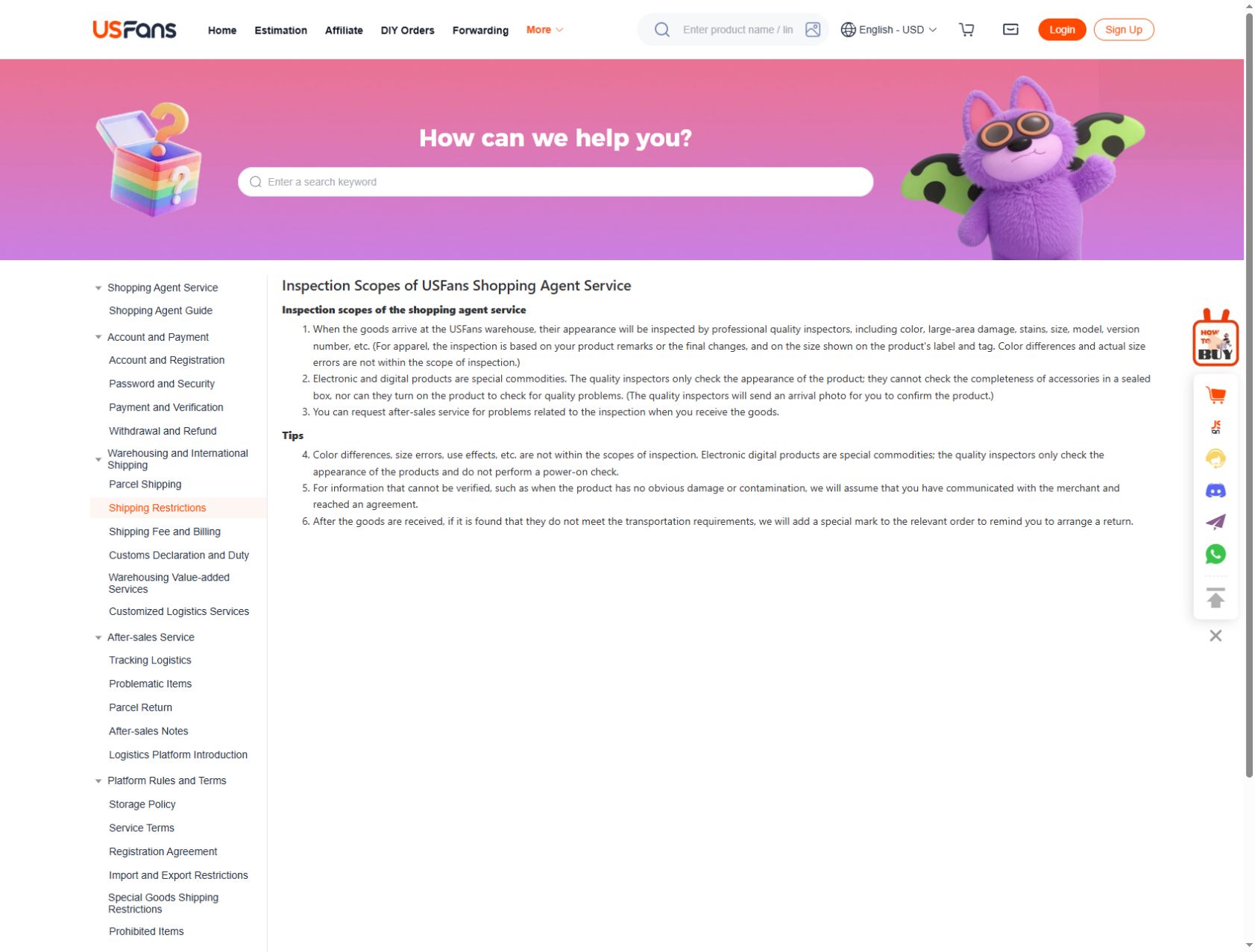
The USFans inspection description checked on 30 September 2026 covers visible appearance and garment labels, but excludes actual size errors, colour differences and performance in use. Its electronics section rules out powering devices on and checking the completeness of accessories inside a sealed box. A size shown on a label is therefore not a recorded garment measurement, and an intact-looking device is not a completed functional test.
Read the current service description for your item if the distinction matters. A photograph may answer a visible question while leaving a different, equally important question unresolved.
Match three things before judging the picture
Check the order reference privately, the selected variation and the item visible in the image. If one of these differs from your saved choice, resolve the identity issue first. Zooming in on seams will not help if you are inspecting another size or version.
Compare the actual selected option, not just the product page's main image. A gallery can show multiple colours, while your order concerns only one. The spreadsheet links guide explains how to keep that choice recoverable.
Choose the view that answers your concern
| Concern | Useful next view or information |
|---|---|
| Wrong colour or version | Overall item view and relevant identifying detail |
| Label differs from the request | Readable label connected to the same item |
| Possible stain or damage | Close-up plus a wider view showing its location |
| Garment length | Readable measurement with clear endpoints |
| Missing piece in a set | View showing the included pieces or confirmation of contents |
A close-up without context may make a small feature look more significant than it is. An overall view may conceal the detail you need. Use both when the connection between the item and the concern is otherwise unclear.
Do not change colours or remove marks from an image you are using to ask about a defect. Keep an unaltered private copy and explain what you want checked.
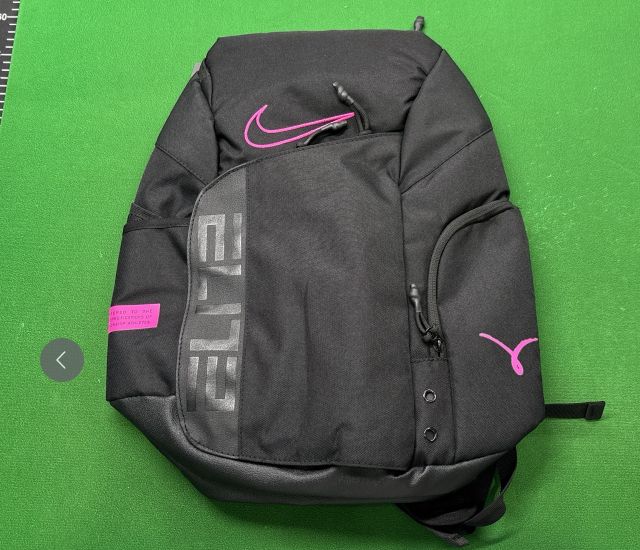
Read a front view: a black-and-pink backpack
The public Product QC gallery on a USFans backpack listing, viewed on 30 September 2026, shows the black-and-pink bag pictured here. You can follow the outline of the front pocket, locate its gray ELITE lettering and see the zipper pulls. Those details make the front view useful for comparing a colour arrangement or identifying the area you want photographed more closely.
For a question about the shoulder straps, ask for a rear view with their attachment points visible. For a question about an inside compartment, ask for that compartment to be opened. Seeing the front zipper does not show how smoothly it moves. The partial ruler at the edge also supplies no reliable bag measurement: the required endpoints are not shown together. Use this public reference to choose a useful angle, then check the photographs associated with your own selected item.
Compare a jacket without inventing a verdict
For a jacket, first confirm the garment and option. Then consider the visible fastening, pocket placement and any relevant label. If length would determine whether you keep it, request or inspect that measurement using the same endpoints as your reference garment.
Inspect the jacket listing on OG
This is a listing to compare, not a warehouse QC example from a completed order. Its pictures should not be relabelled as your item or used to claim that an inspection was passed. The size guide addresses measurements; a photograph alone cannot recreate how the jacket feels when worn.
Use a QC finder as a reference, not proof of your order
When searching for a USFans QC finder, establish what the displayed images represent. They might be references from another purchase, listing images or results selected by visual similarity. Similarity does not establish the same production batch, seller option or item condition.
If another buyer's photo helps you notice a feature, turn it into a question about your own item. Do not transfer their acceptance decision automatically. You may have a different preferred fit or a different reason for buying.
The image-search guide covers finding candidates from a reference. It is a separate activity from checking an item already associated with an order. This guide does not promise a particular QC-finder database or search integration is available.
Decide between clarification and a remedy
If the image does not answer the question, ask for a specific clarification. If it shows a mismatch, describe that mismatch and the requested option. Avoid a vague message such as “bad quality” when the issue is that a different colour arrived.
Check the applicable return conditions promptly rather than assuming any photo concern guarantees an exchange or refund. Keep the original request and response together. A message saying the issue will be discussed is not confirmation that the remedy has been approved.
Before international shipment, revisit unresolved concerns through the buying guide. Do not let parcel preparation turn an unanswered item question into a presumed acceptance.
Share only what another reader needs
Crop or cover names, account identifiers, addresses, order codes and identifying barcodes before posting an image publicly. Check the background as well as the main item. A product detail can usually be discussed without exposing a transaction label.
Permission to view an image is not automatically permission to republish it. Use your own suitable material or obtain permission for another person's photo. A policy screenshot can explain a service's stated scope, but it is not an example of a garment that actually arrived.
Can QC establish authenticity?
An ordinary visual photo set does not establish authenticity or every hidden material and construction detail. Do not turn a visible similarity into a stronger conclusion.
Does the right label mean the right fit?
It can help confirm the labelled option. Your fit decision still depends on relevant measurements, cut and intended use.
What should I keep after reviewing the photos?
Keep the item, option, question and actual observation together in your private order notes. Your USFans spreadsheet can retain the public candidate details without exposing those private records.